

Post purchase is where the money is. Winning new customers costs 5-7x more than keeping existing ones. Yet many stores limit themselves to a single review request email after the purchase. But the real work only begins after the first purchase. Here is the complete Post Purchase strategy, flow by flow.
01The Post Purchase journey at a glance
- Trigger
- after the purchase
- Scope
- 9 flow types
- Goal
- accompany customers chronologically
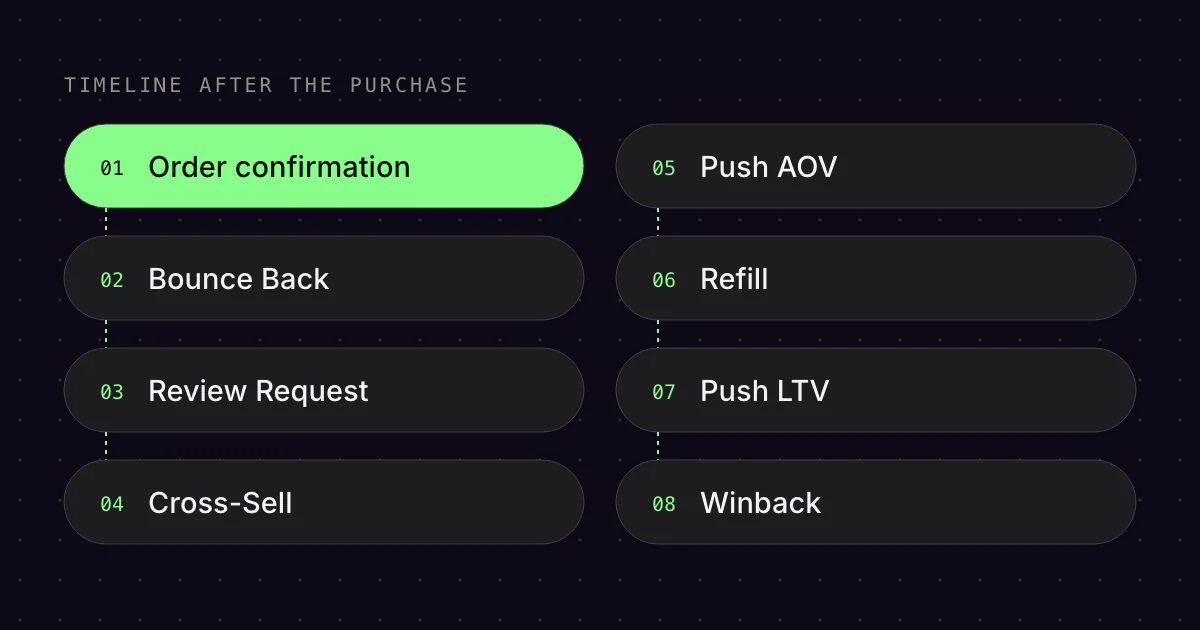
Post Purchase Flows accompany the customer chronologically after the purchase. From the moment of the order to the winback months later. Each flow has a clear goal:
- Order Confirmation / Shipped / Delayed: Transparency and trust
- Post Purchase Bounce Back: Trigger the second purchase (THE core flow!)
- Review Request: Collect social proof
- Cross-Sell: Suggest matching products
- Push AOV: Show higher-priced products
- Refill: Restocks for consumable products
- Push LTV: Push lifetime value with tiered discounts
- Winback: Reactivate inactive customers
- Birthday / Anniversary: Emotional touchpoints
Important: Post Purchase Flows must differentiate by number of orders. A first-time buyer needs onboarding and trust-building. A fourth-time buyer needs loyalty rewards and referral incentives.
02Order Confirmation, Shipped, Delayed (transactional flows)
- Trigger
- order, shipping, delay
- Scope
- 4 email types
- Goal
- transparency and trust
Trigger: Placed Order / Fulfilled Order / 6 days without fulfilment[2]
Goal: Transparency, trust, support
These flows are mandatory but often underestimated. Structure according to the Emailfy Best Practice:
- Order Confirmation: Immediately after the order: “Your order has been confirmed”
- Partial Shipment: 1h after a partial shipment: “Parts of your order are on their way”[3]
- Order Shipped: Immediately after shipping: “Your complete order has been shipped”
- Order Delayed: 6 days without fulfilment: “Your order is delayed” (again after 12 days: “We haven’t forgotten you”)
Best Practice: Don’t use these emails just for tracking links. Add unboxing tips or help with the order. Cross-sell suggestions belong in separate emails, because with product recommendations, Klaviyo no longer treats an order email as transactional but as a marketing email.[9] These emails have the highest open rates in the entire account.
03Post Purchase Bounce Back (the core flow!)
- Trigger
- Fulfilled Order
- Scope
- 6 paths
- Goal
- trigger the next purchase
Trigger: Fulfilled Order (marked as fulfilled in Shopify, so usually shipped, not delivered).[2][6] For the timings “after delivery”, use Delivered Shipment if your shipping provider reports delivery to Shopify.[2] Otherwise, add the usual shipping time.
Goal: Trigger the second/next purchase, activate referrals, build loyalty
Post Purchase Bounce Back is the most complex and most important flow in the entire Post Purchase setup. It has 6 different paths based on the number of orders. Here is the structure:
Path A: first-time buyers (1 order)
Goal: onboarding, strengthen trust, trigger the second purchase.
- Email 1 (1 day after delivery): Founder message (text-only, VHC style): thank them for the purchase, delivery, FAQ, support
- Email 2 (2 days later): How to use the product + UGC & reviews
- Email 3 (2 days later): About us + socials
- Email 3b (10 days later): Discount on the next order (valid for 14 days)
- Email 4 (1-2 days later): Reminder “only 48h left”
- Email 5 (3 days later): Typeform: “Why no second purchase?”
- Email 6 (immediately): Offer upgrade / objection handling (based on the Typeform)
- Email 7 (20h later): Last Chance “only 4h left”
Path B: second-time buyers (2 orders) + Path C: third-time buyers (3 orders)
Goal: activate referrals (influence.io integration).[8]
- Email 1 (1 day after delivery): Founder message (text-only)
- Email 2 (2 days later): Referral offer: “€10 off for a referral” (influence.io link)
- Email 3 (10 days later, if no referral): Referral reminder
- Email 4 (10 days later, if no referral): Founder message with emphasis on referrals (text-only)
- Email 5 (14 days later, if no referral): Typeform: “Why no referral?”
Why referrals from purchase 2? Because the customer is now convinced. They have bought twice, know the quality and can recommend you authentically.
Path D: fourth-time buyers (4 orders)
Goal: reward loyalty.
- Email 1 (1 day after delivery): Founder message: “Thank you for your 4th purchase already” + discount
- Email 2 (12 days later, if no purchase): Reminder “only 48h left”
Path E + F: fifth-time buyers and 6+ orders
Goal: say thank you, show appreciation.
- Email 1: Founder message (varies by frequency, e.g. “You’re part of the family now”)
Split logic: The paths are split automatically by Fulfilled Order = X over all time.[4] Every customer gets exactly the flow that matches their number of orders.
04Review Request Flow
- Trigger
- 6 days after delivery
- Scope
- 2 emails, 2 additional flows
- Goal
- collect social proof
Trigger: 6 days after delivery (Delivered Shipment or Fulfilled Order plus the usual shipping time)[2]
Goal: Collect social proof, strengthen trust signals
Review requests are essential, but many people get them wrong. Emailfy Best Practice:
- Email 1 (6 days after delivery): Review request (filter: Reviewed zero times over all time)
- Email 2 (7 days later, if no review): Reminder
New: positive/negative review flows
- Positive Review Flow: Immediately after a positive review: a thank-you. A promised reward such as a discount, however, goes to everyone who leaves a review, regardless of the rating.[10]
- Negative Review Flow: Immediately after a negative review: support reaches out proactively[5]
Timing tip: 6 days is the sweet spot. The product has arrived and been used, but the excitement is still fresh.
05Cross-Sell Flow
- Trigger
- 15 days after fulfilment
- Scope
- 2 emails
- Goal
- suggest matching products
Trigger: 15 days after Fulfilled Order[6]
Goal: Increase AOV, suggest matching products
Cross-selling only works if the suggestions are relevant. Emailfy Best Practice:
- Email 1 (15 days after purchase): Split by purchased products: bestseller buyers get other products, other buyers get bestsellers
- Email 2 (2 days later): Present more matching products
Split logic: Use conditional splits based on Placed Order where Items contains [Product] to deliver personalised recommendations.[2]
06Push AOV Flow
- Trigger
- 19 days after fulfilment
- Scope
- 1 email
- Goal
- sell higher-priced products
Trigger: 19 days after Fulfilled Order
Goal: Sell higher-priced products
This flow is new in the Emailfy setup and aims to move customers towards higher-priced products:
- Email 1 (19 days after purchase): Present popular higher-priced products
When to use it? When your range is clearly tiered by price segment (e.g. basic, premium, luxury).
07Refill Flow
- Trigger
- based on consumption
- Scope
- 7 emails
- Goal
- automate restock purchases
Trigger: Based on consumption after Fulfilled Order (for specific products)
Goal: Automate restock purchases
Refill Flows are worth their weight in gold for consumable products (supplements, cosmetics, food). Emailfy Best Practice:
- Email 1 (5 days after purchase): Typeform: “How often do you use the product?” (ask about consumption)
- Email 2 (timing varies based on the Typeform answer): “Running low? Order a refill now”
- Email 3 (7 days later): “Why you should restock” (content, benefits)
- Email 4 (7 days later): “You’re sure to need a refill by now” (reminder)
- Email 5 (3 days later): Discount as an incentive (valid for 48h)
- Email 6 (1 day later): Reminder
- Email 6Q (2 days later): Typeform: “Why no repeat order?”
Split logic: Split by purchased products (consumable products only) + Placed Order = 1 (first-time buyers).
08Push LTV Flow
- Trigger
- 45 days, first-time buyers only
- Scope
- 2 emails
- Goal
- LTV with tiered discounts
Trigger: 45 days after Fulfilled Order (first-time buyers only)
Goal: Push lifetime value with tiered discounts
This flow combines AOV + repeat purchase. Emailfy Best Practice:
- Email 1 (45 days after purchase): Tiered discount: “10% from €X, 15% from €Y, 20% from €Z”
- Email 2 (5 days later): Reminder “only 48h left”
Filter: Fulfilled Order = 1 over all time. This flow is aimed only at first-time buyers, to move them to a second purchase.
09Winback Flow (8+ Emails)
- Trigger
- 60 to 75 days
- Scope
- 8+ emails
- Goal
- reactivate inactive customers
Trigger: 60-75 days after the last purchase (depending on the purchase cycle)[1]
Goal: Reactivate inactive customers
Winback is the last attempt to bring customers back before they are lost. Emailfy Best Practice (path for first-time buyers):
- Email 1: New products and brand (dynamic: new arrivals category)
- Email 2 (7 days later): Sale products (dynamic)
- Email 3 (7 days later): Refer to the previous purchase, show reviews
- Email 4 (7 days later): “We haven’t heard from you in a while” + increased discount
- Email 5 (7 days later): Coupon code reminder
- Email 6 (2 days later): Flash sale (higher discount than before)
- Email 7 (2 days later): Typeform: “Why not?”
- Email 8a (7 days later): “Where did you go?”
- Email 8b (2 days later): Last Chance
Split logic: First-time buyers vs. repeat customers. Repeat customers get adapted content (less onboarding, more loyalty).
Discount escalation: Winback uses the most aggressive discount strategy. From a normal discount to an increased discount to a flash sale. It is the last chance.
10Birthday Flow
- Trigger
- 1 week before
- Scope
- up to 3 emails
- Goal
- emotional connection
Trigger: 1 week before the birthday + on the birthday[7]
Goal: Emotional connection, spontaneous purchase
Birthday Flows have high conversion rates because they are personal. Emailfy Best Practice:
- Email 1 (1 week before): “Your birthday is coming up, treat yourself” + euro voucher
- Email 2a (on the birthday, if they bought): “Happy Birthday” (no voucher needed, they’ve already bought)
- Email 2b (on the birthday, if they didn’t buy): “Happy Birthday” + the euro voucher again
- Email 3 (7 days later, if no purchase): Reminder
Split logic: Split by Placed Order since Flow start to avoid someone getting a discount twice.[1]
11First Purchase Anniversary Flow
- Trigger
- 365 days after first purchase
- Scope
- 2 emails
- Goal
- celebrate loyalty
Trigger: 365 days after the first purchase
Goal: Celebrate loyalty, create an emotional touchpoint
An often overlooked flow. Emailfy Best Practice:
- Email 1 (365 days after the first purchase): “A year ago, you ordered from us” + euro voucher
- Email 2 (5 days later): Reminder
12Repeat Purchase Nurture Flow (better to deactivate)
- Trigger
- after fulfilment
- Scope
- only as a fallback
- Goal
- prompt repeat purchases
Trigger: After Fulfilled Order
Goal: Prompt repeat purchases
Our recommendation: “better to deactivate”. Why? Because this flow overlaps with Post Purchase Bounce Back, Cross-Sell and Refill. Only use it if the other flows don’t kick in.
Bottom line: Post Purchase Flows are the heart of a profitable email setup. They turn one-time buyers into loyal regular customers. The Emailfy Best Practice: split by number of orders, referrals from purchase 2, Typeform feedback in every flow, and discount escalation over time. That’s how you build a system that accompanies customers from purchase 1 to purchase 10+.
FAQ
Why are Post Purchase Flows worth it?
According to Klaviyo, it costs on average five times as much to win a new customer as to keep an existing one. Klaviyo also reports that post-purchase messages get a 217% higher open rate than the average campaign. Interest is high after the purchase, and that is exactly where these flows come in.
How do I build a Winback Flow in Klaviyo?
The flow starts with the “Placed Order” event. A filter “Placed Order zero times since starting this flow” stops it as soon as someone buys again. Klaviyo advises setting the first wait time slightly longer than your usual purchase cycle. Depending on the product range, we start after 60 to 75 days.
What do I need for a Birthday Flow?
You need the date of birth as a date field in the profile, for example via a sign-up form, a CSV import or your store integration. Then you create a flow with a date trigger in Klaviyo. You can have it start before the birthday and set it to repeat every year.
How do I deal with negative reviews?
Klaviyo shows a flow with the trigger “Submitted review” and the filter “review_rating is at most 3”. For a review with one to three stars, your customer service gets a notification straight away and can get in touch. Once the problem is solved, the customer can edit their review within 30 days.
How do I distinguish first-time buyers from regular customers in a flow?
With a conditional split by number of orders. Klaviyo’s example for first-time buyers is “Placed Order equals 1 over all time”. In our setup, first-time buyers get onboarding and trust-building, customers from their second purchase get a referral offer and frequent buyers get a personal reward. So every email matches the customer’s existing relationship.
Sources
- Klaviyo Help Center: “How to create a winback flow”, updated 7 Oct 2026. https://help.klaviyo.com/hc/en-us/articles/115002775192 (accessed 17 Oct 2026)
- Klaviyo Help Center: “Shopify data reference”, updated 18 Nov 2025. https://help.klaviyo.com/hc/en-us/articles/115005080447 (accessed 17 Oct 2026)
- Klaviyo Help Center: “How to create a fulfilled partial order flow for Shopify”, updated 8 Oct 2026. https://help.klaviyo.com/hc/en-us/articles/4401771131419 (accessed 17 Oct 2026)
- Klaviyo Help Center: “How to create a post-purchase flow”, updated 8 Oct 2026. https://help.klaviyo.com/hc/en-us/articles/360028872611 (accessed 17 Oct 2026)
- Klaviyo Help Center: “How to create a customer service ticket when you receive a negative review”, updated 7 Jul 2025. https://help.klaviyo.com/hc/en-us/articles/16680027976731 (accessed 17 Oct 2026)
- Klaviyo Help Center: “How to create an upsell or cross-sell flow”, updated 7 Oct 2026. https://help.klaviyo.com/hc/en-us/articles/115002775212 (accessed 17 Oct 2026)
- Klaviyo Help Center: “How to build a birthday flow”, updated 8 Oct 2026. https://help.klaviyo.com/hc/en-us/articles/360054242492 (accessed 17 Oct 2026)
- Shopify App Store: “Influence: Loyalty & Referral”, undated. https://apps.shopify.com/influence-io (accessed 17 Oct 2026)
- Klaviyo Help Center: “Understanding transactional messages”, updated 23 Dec 2025. https://help.klaviyo.com/hc/en-us/articles/26024442679835 (accessed 17 Oct 2026)
- Klaviyo Help Center: “How to request reviews from your customers with Klaviyo Reviews flows”, updated 3 Feb 2026. https://help.klaviyo.com/hc/en-us/articles/16319809379611 (accessed 17 Oct 2026)
This article is by Emailfy. We set up Klaviyo for Shopify stores, which is exactly what we write about here. How we work: Editorial guidelines.