

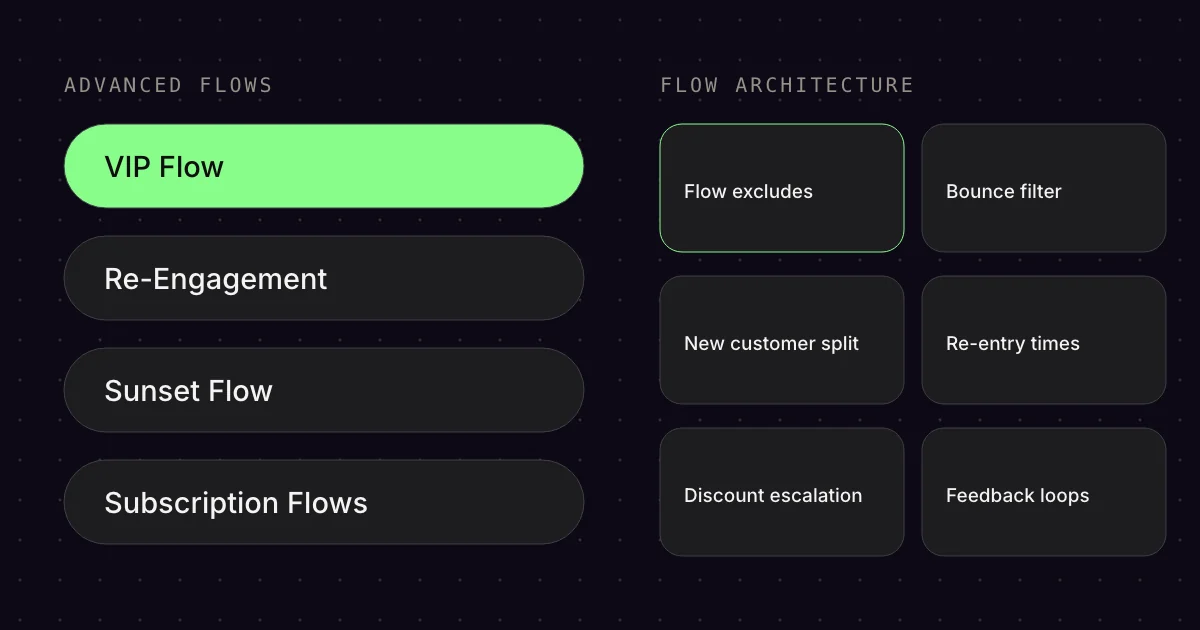
You’ve set up Welcome, Cart Abandonment and Post Purchase. But the system still doesn’t feel complete. Contacts slip through the cracks. Some get duplicate emails. Others get none at all. This is where the Advanced Flows come in, along with the architecture that holds everything together.
01The flows that round off the system
- Trigger or topic
- safety net
- Scope
- complete strategy
- Goal
- lose no contacts
Advanced Flows are not “nice-to-have” features. They are the safety net that prevents contacts from getting lost or the list from getting polluted. Here is the complete strategy:
02VIP Flow
- Trigger or topic
- Entered VIP Segment
- Scope
- 3 emails
- Goal
- reward VIP status
Trigger: Entered VIP Segment (segment-based)[1]
Goal: Reward VIP status, strengthen loyalty
The VIP Flow is not a time-based flow but a segment-based one. As soon as a customer enters the VIP segment (e.g. 3+ purchases or LTV over €X), they are rewarded:
- Email 1 (immediately): “You’re a VIP now” + reward/voucher (valid for 7 days)
- Email 2 (3 days later, if the email was opened): Voucher reminder
- Email 2b (3 days later): Reminder “only active for another 24h” (urgency)
VIP segment definition: Based on LTV, number of orders or Customer Engagement Score. The Emailfy Best Practice uses number of orders + total revenue as filters.
03Re-Engagement Flow
- Trigger or topic
- inactive for 90+ days
- Scope
- 2 emails
- Goal
- reactivate inactive contacts
Trigger: Inactive for 90+ days (no open, no click)
Goal: Reactivate inactive contacts before they reach the Sunset
Re-engagement is the step before Sunset. A last chance to wake contacts up:
- Email 1: Clickbait subject line: “Are you still there?”
- Email 2 (2 days later): Special offer (not revealed in the subject line, to trigger an open)
Filter: Opened or Clicked Email zero times in last 90 days + Placed Order zero times in last 90 days.[3]
04Sunset Flow (the most important hygiene flow!)
- Trigger or topic
- inactive for 180+ days
- Scope
- 3 emails, 1 flag
- Goal
- remove inactive contacts cleanly
Trigger: Inactive for 180+ days (no open, no click)
Goal: Remove inactive contacts from the list cleanly
Why delete contacts? Because inactive recipients worsen your deliverability.[3] ISPs like Gmail assess how many of your emails get opened.[4] Lots of unopened emails = a worse inbox placement rate for ALL your contacts.
Emailfy Best Practice:
- Email 1: Ask whether they’re still interested in the newsletter (“Shall we stay in touch?”)
- Email 2 (3 days later): Special offer as bait
- Email 3 (3 days later): Clickbaity subject line & reminder
- Email 4 (4 days later): Update Profile Property →
Unengaged = True[4]
What happens with Unengaged = True? These contacts are excluded from all flows and campaigns. They stay on the list (for GDPR/compliance) but no longer receive emails.
Important: The Sunset Flow must be GDPR-compliant. You don’t need consent to delete. If anything, the GDPR requires you to delete data you no longer need for its purpose.[12] If you keep contacts anyway, set the property and exclude them from all flows. This is not legal advice.
05Subscription Flows (for subscription models)
- Trigger or topic
- subscription events
- Scope
- 3 flows
- Goal
- prevent churn
Trigger: Started Subscription / Upcoming Subscription Charge / Cancelled Subscription
Goal: Increase subscription retention, prevent churn
Subscription Flows are essential for stores with a subscription model (e.g. supplements, coffee, razor blades). Emailfy Best Practice:
- Started Subscription: “Welcome to your subscription” + explain the benefits
- Upcoming Subscription Charge: 2-3 days before the charge: “Your next delivery is coming soon”
- Cancelled Subscription: Immediately: “Sorry to see you go” + ask for feedback + winback offer
06Flow architecture: the invisible structure that holds everything together
- Trigger or topic
- invisible structure
- Scope
- 9 building blocks
- Goal
- prevent duplicate emails
Individual flows are only half the battle. The other half is the architecture around them. Here is what 90% of stores get wrong:
1. Consent filter (mandatory in EVERY flow!)
Every flow must make sure that only contacts with consent receive emails. Emailfy Best Practice filter:
- Newsletter List OR
Person can receive email marketingwith the reasonBecause person subscribed to email marketing[9] OR- Placed Order at least once over all time, but only if all conditions of § 7(3) UWG are met[10]
This filter only lets through contacts who have agreed (newsletter sign-up, marketing opt-in). Since December 2022, the old Shopify field “Accepts Marketing” no longer determines subscription status in Klaviyo.[11] A purchase alone is not consent: you may only email customers without consent if all conditions of § 7(3) UWG are met, such as advertising only your own similar products and pointing out the right to object when collecting the address and in every email.[10] This is not legal advice.
2. Flow excludes matrix (prevents duplicate emails)
The most common mistake: someone is in several flows at the same time. The result? Duplicate emails, a spammy feeling, poor performance. The solution: flow excludes.
Emailfy Best Practice flow excludes matrix:
- Checkout Abandonment blocks Cart Abandonment for 2 days
- Cart Abandonment blocks Browse Abandonment for 2 days
- Cart Abandonment blocks Browse Collection for 2 days
- Browse Abandonment blocks Browse Collection for 1 day
- Post Purchase Flows block all Pre Purchase Flows
- Winback blocks Refill for 2 days (and vice versa)
Rule: The flow with the higher purchase probability blocks the weaker one. This ensures the customer only receives the most relevant flow.
3. Bounce filter (protects your deliverability)
Contacts with lots of bounces damage your sender reputation.[6] Emailfy Best Practice filter in EVERY flow:
- Bounced Email less than 3 times in last 30 days
Klaviyo already suppresses hard bounces automatically, soft bounces only after more than seven in a row.[6] This filter catches addresses that are repeatedly temporarily undeliverable (soft bounces, for example because of a full mailbox) before that point.
4. New vs. existing customer split (in almost EVERY flow!)
New and existing customers need different messaging. New customers need onboarding, trust-building, USPs. Existing customers already know the brand and need direct purchase incentives.
Emailfy Best Practice split:
- New customers: Placed Order zero times over all time
- Existing customers: Placed Order at least once over all time
Additional protection for existing customers in many flows:
- Placed Order zero times in last 25 days AND
- Received Winback/Refill/RPN Flow zero times in last 2 days
This prevents existing customers who have just bought or are in another Post Purchase Flow from getting Pre Purchase emails again.
5. Flow re-entry times (prevent flow spam)
Flows shouldn’t repeat endlessly. Emailfy Best Practice re-entry times:
- Browse Abandonment: 14 days
- Browse Collection: 30 days
- Cart Abandonment: 7 days
- Checkout Abandonment: 7 days
- Welcome Flow: Only once (never repeat!)[1]
- Post Purchase Bounce Back: After every order
- Winback: 60-90 days
Rule: The higher the purchase intent in the flow, the shorter the re-entry time. Checkout Abandonment may trigger more often than Browse Collection.
6. Conditional content & email variants
Most flows have an Email 6 with several variants (3-6 options). Why? Because not every customer has the same objection. The Emailfy Best Practice uses conditional content to show different content based on behaviour:
- Browse Abandonment Email 6: 6 variants (offer upgrade, bundles, bestsellers, support, reviews, objection handling)
- Cart Abandonment Email 6: 3 variants (offer upgrade, support, objection handling)
- Checkout Abandonment Email 6: 5 variants (founder message, USPs+competitor comparison, support, UGC+reviews, offer upgrade)
Implementation: Either via conditional content blocks in Klaviyo or as separate emails with flow splits.[8]
7. Qualitative feedback loops (Typeform in every flow)
The biggest missing piece in most setups: no feedback. People guess why customers don’t buy instead of simply asking them. Emailfy Best Practice: a Typeform email in every larger flow.
Example questions:
- Welcome Flow: “Why haven’t you bought yet?”
- Browse Abandonment: “Why no products in the cart?”
- Cart Abandonment: “Why not go to checkout?”
- Checkout Abandonment: “Why didn’t you complete your purchase?”
- Post Purchase Bounce Back: “Why no second purchase?”
- Winback: “Why haven’t you come back?”
Filter for Typeform emails: Filled out survey zero times in last 30/90 days (depending on the flow). This ensures contacts aren’t surveyed too often.
What do you do with the answers? They feed into objection handling (Email 6+7) or general optimisations (e.g. the most common objection is addressed on the website).
8. Discount escalation across flows
Discounts should escalate over time, not appear straight away in Email 1. Emailfy Best Practice discount escalation:
- Welcome Flow: Discount in Email 1 → upgrade in Email 7 → Last Chance in Email 8
- Browse Abandonment: No discount → discount in Email 3 → upgrade in Email 6
- Cart Abandonment: No discount → discount in Email 3 → upgrade in Email 6
- Checkout Abandonment: No discount → free shipping discount in Email 3 → upgrade in Email 6
- Winback: Discount → increased discount → flash sale (highest discount)
Why escalate? Because otherwise you train customers to wait. If the best discount is always in Email 1, why would anyone buy earlier?
9. VHC emails (Value High Content, text-only)
Not every email needs design. The Emailfy Best Practice uses VHC emails (text-only, personal) at strategic points:
- Founder messages (Post Purchase Bounce Back, Welcome Flow)
- Support-style reminders (Browse/Cart Abandonment Email 4)
- Personal follow-ups (VIP Flow, Birthday Flow)
Why text-only? Because it feels more personal. Like an email from a real person, not from a marketing team.
077 common mistakes that break the whole system
- Trigger or topic
- common mistakes
- Scope
- 7 mistakes
- Goal
- clean deliverability
Even with perfect flows, the system can fail if the architecture is wrong. Here are the 7 biggest mistakes:
1. Setting up only Cart Abandonment and ignoring the rest
Cart Abandonment is important, but it’s only a small part of the funnel. Many customers drop off earlier (Browse Abandonment, Browse Collection, Active on Site). If you only have Cart Abandonment, you lose 70% of the opportunities.
2. No separation of new and existing customers
Existing customers don’t need a USP explanation or an About us story. They already know the brand. If you send both the same emails, you waste potential (new customers need more context, existing customers need more direct incentives).
3. No flow excludes (duplicate emails = spammy feeling)
If someone is in Cart Abandonment AND Browse Abandonment at the same time, they get duplicate emails. That feels like spam and lowers the performance of both flows. Flow excludes are a must.
4. A discount straight away in Email 1 (trains customers to wait)
If the best discount is always in the first email, you train customers to wait. They learn: “If I wait, I get more.” Better: build trust first, then offer a discount. Discount in Email 3-4, not Email 1.
5. Post Purchase = just a review request
Review requests are important, but Post Purchase is so much more. No onboarding, no cross-sell, no referral, no refill, no winback. And yet Post Purchase is the most profitable area. Keeping existing customers costs 5-7x less than winning new ones.
6. No Sunset Flow (poor deliverability)
Inactive contacts poison your list. ISPs like Gmail assess how many of your emails get opened.[4] Lots of unopened emails = a worse inbox placement rate for ALL contacts. Sunset isn’t a “nice-to-have”, it’s a must.
7. No feedback loops (guessing instead of asking)
Most stores guess why customers don’t buy. “Maybe the price is too high? Maybe trust is missing?” Yet you could simply ask. Typeform emails in every flow give you qualitative objections you can address directly.
Bottom line: Advanced Flows and the architecture behind them make the difference between a working and an excellent email system. Consent filters, flow excludes, new/existing customer splits, bounce filters, re-entry times, conditional content, feedback loops and discount escalation. These are the invisible structures that make sure no contact slips through the cracks and your deliverability stays clean.
FAQ
What is a Sunset Flow?
A Sunset Flow is the last email series to contacts who haven’t responded in a long time. Klaviyo recommends three emails at most. Anyone who then neither opens nor clicks gets the property “Unengaged = True” and is suppressed via a segment. Suppressed profiles get no marketing emails and don’t count towards your Klaviyo plan.
When does a contact count as inactive in Klaviyo?
Klaviyo’s template treats contacts as inactive if they received at least five emails but opened or clicked none in the last 90 days. You can adjust the time frame to your sending frequency. Note: Apple Mail Privacy Protection can artificially inflate open rates, so opens alone aren’t a reliable sign of genuine interest.
How often can someone go through the same flow again?
In Klaviyo, you set this with the “Re-entry criteria” option in the trigger: once only, on every entry or after a minimum period. List and segment flows such as the Welcome Series run only once by default, while event-triggered flows allow re-entry. The setting is currently being rolled out to all accounts.
What does Smart Sending do in Klaviyo?
Smart Sending skips recipients who have already received a message recently. For emails, the window is 16 hours by default, for SMS it is 24 hours. It only applies to marketing messages. Transactional emails are never skipped. Klaviyo doesn’t automatically reschedule skipped messages.
How do I define a VIP segment in Klaviyo?
Klaviyo names three approaches: high-revenue customers, customers with many orders, or a mix of both. Use a fixed time frame, such as the last 365 days, otherwise inactive long-term customers end up in the segment too. We combine number of orders and total revenue and use this segment to start the VIP Flow.
Sources
- Klaviyo Help Center: “How to create a segment- or list-triggered flow”, updated 8 Oct 2026. https://help.klaviyo.com/hc/en-us/articles/360003040052 (accessed 17 Oct 2026)
- Klaviyo Help Center: “How to create a segment of VIP customers”, updated 18 Nov 2025. https://help.klaviyo.com/hc/en-us/articles/115005065707 (accessed 17 Oct 2026)
- Klaviyo Help Center: “How to create an unengaged segment”, updated 7 Jul 2025. https://help.klaviyo.com/hc/en-us/articles/32826141659675 (accessed 17 Oct 2026)
- Klaviyo Help Center: “How to create a sunset flow”, updated 11 Mar 2026. https://help.klaviyo.com/hc/en-us/articles/360017518492 (accessed 17 Oct 2026)
- Klaviyo Help Center: “Understanding suppressed email profiles”, updated 30 Mar 2026. https://help.klaviyo.com/hc/en-us/articles/115005246108 (accessed 17 Oct 2026)
- Klaviyo Help Center: “Understanding bounced emails in Klaviyo”, updated 13 Feb 2026. https://help.klaviyo.com/hc/en-us/articles/115005250408 (accessed 17 Oct 2026)
- Klaviyo Help Center: “Understanding Smart Sending in Klaviyo”, updated 6 Aug 2025. https://help.klaviyo.com/hc/en-us/articles/115002779311 (accessed 17 Oct 2026)
- Klaviyo Help Center: “How to show or hide template blocks and sections based on dynamic variables”, updated 5 Aug 2025. https://help.klaviyo.com/hc/en-us/articles/7655965301531 (accessed 17 Oct 2026)
- Klaviyo Help Center: “Changes to flow filtering on consent reference”, updated 7 Oct 2026. https://help.klaviyo.com/hc/en-us/articles/20016490907163 (accessed 17 Oct 2026)
- Gesetze im Internet: “§ 7 Unzumutbare Belästigungen (UWG)”, updated 12 May 2026. https://www.gesetze-im-internet.de/uwg_2004/__7.html (accessed 17 Oct 2026)
- Klaviyo Help Center: “Shopify Accepts Marketing subscriber reference”, updated 8 Jan 2026. https://help.klaviyo.com/hc/en-us/articles/25184578360603 (accessed 17 Oct 2026)
- dsgvo-gesetz.de: “Art. 17 DSGVO Recht auf Löschung („Recht auf Vergessenwerden“)”, undated. https://dsgvo-gesetz.de/art-17-dsgvo/ (accessed 17 Oct 2026)
This article is by Emailfy. We set up Klaviyo for Shopify stores, which is exactly what we write about here. How we work: Editorial guidelines.