

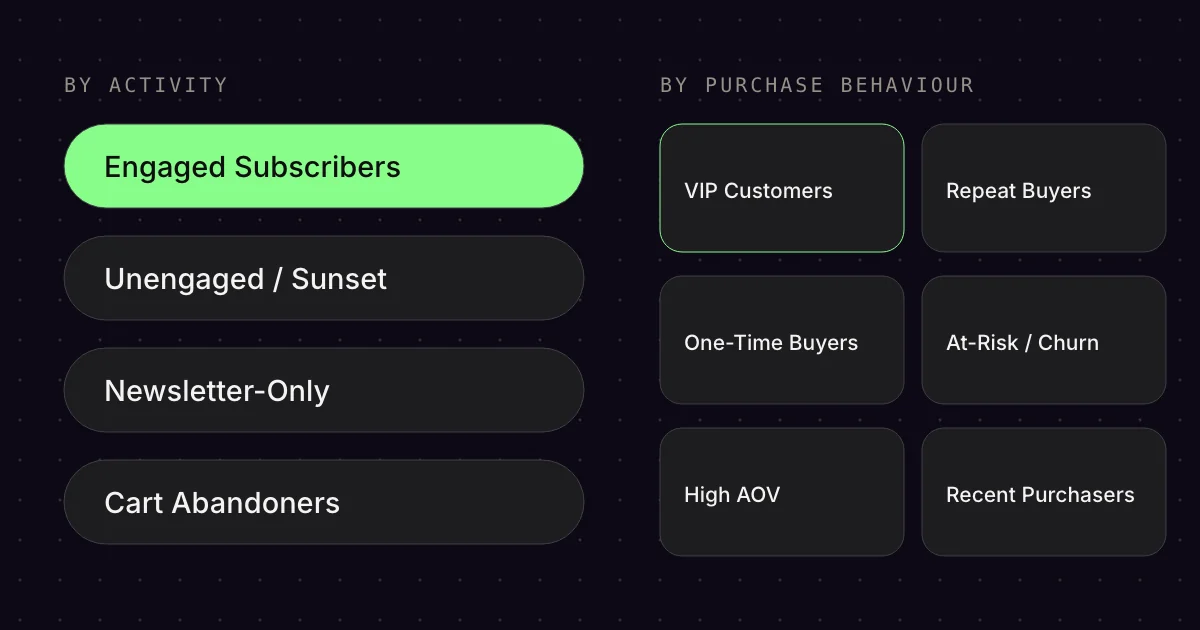
Segmentation is the foundation of successful email campaigns. Instead of sending everything to everyone, you reach the right people with the right message. Here are the 10 segments every e‑commerce store should use in Klaviyo.
Each segment below has three parts: what it is, how to build it in Klaviyo and what to use it for. You create new segments under Audience and Lists & segments.[2]
01Engaged Subscribers
- Criterion
- open or click
- Time frame
- 30 to 90 days
- Use case
- campaigns
What it is: Contacts who opened or clicked an email in the last 30-90 days.
How to build it: You create this segment in the segment builder, for example with an open or click in the last 90 days.[2]
What to use it for: Your main audience for campaigns. People who are active want to hear from you. Highest conversion rates, best deliverability.
02Unengaged / Sunset
- Criterion
- no open
- Time frame
- 90 days
- Use case
- exclusion or Sunset Flow
What it is: Contacts who haven’t opened an email in 90+ days.
How to build it: Segment with the condition: What someone has done (or not done) → Opened Email → zero times in the last 90 days.[3]
What to use it for: Either try re-engagement (Sunset Flow) or suppress them. Inactive contacts hurt your inbox placement rate.
03VIP Customers
- Criterion
- revenue or number of orders
- Time frame
- 365 days
- Use case
- exclusive offers
What it is: Your most valuable customers by lifetime value.
How to build it: You create this segment yourself. Klaviyo recommends revenue or the number of orders in the last 365 days as the condition.[4]
What to use it for: Exclusive offers, early access to sales, VIP treatment. These customers deserve special treatment.
04Repeat Buyers
- Criterion
- at least 2 orders
- Time frame
- since joining
- Use case
- cross-sell
What it is: Contacts who have bought at least twice.
How to build it: Segment with What someone has done → Placed Order → at least 2 times since joining your list.
What to use it for: Cross-sell, upsell, loyalty programmes. Repeat buyers already trust your brand.
05One-Time Buyers
- Criterion
- exactly 1 order
- Time frame
- since joining
- Use case
- second purchase
What it is: Customers who have bought exactly once.
How to build it: What someone has done → Placed Order → exactly 1 time since joining your list.
What to use it for: Triggering the second purchase. The hardest step. Targeted Post Purchase Flows + repeat purchase campaigns.
06At-Risk / Churn
- Criterion
- no more purchases
- Time frame
- 90 days
- Use case
- winback
What it is: Customers who used to be active but haven’t bought for X days (e.g. 60-120 days depending on your product cycle).
How to build it: What someone has done → Placed Order → at least once over all time AND zero times in the last 90 days.
What to use it for: Winback campaigns with special incentives to bring them back before they churn for good.
07High AOV
- Criterion
- order value above threshold
- Time frame
- your choice
- Use case
- premium products
What it is: Contacts whose Average Order Value is above average.
How to build it: What someone has done → Placed Order → where Sum of Total Price is greater than X (e.g. €150, depending on your AOV).
What to use it for: Premium products, bundles, higher-priced new arrivals. These customers spend more.
08Recent Purchasers
- Criterion
- order
- Time frame
- 14 days
- Use case
- exclusion or cross-sell
What it is: Contacts who bought in the last 7-14 days.
How to build it: What someone has done → Placed Order → in the last 14 days.
What to use it for: Suppress them from certain campaigns (e.g. a flash sale shortly after a purchase). Or run targeted cross-sell campaigns if the product is complementary.
09Newsletter-Only (never purchased)
- Criterion
- never ordered
- Time frame
- all time
- Use case
- first purchase
What it is: Contacts who signed up but have never ordered.
How to build it: What someone has done (or not done) → Placed Order → zero times over all time.
What to use it for: Conversion-focused campaigns. First purchase incentives, testimonials, trust-building content.
10Cart Abandoners
- Criterion
- checkout without purchase
- Time frame
- 7 days
- Use case
- addition to the flow
What it is: Contacts with active abandoned carts (not purchased yet).
How to build it: What someone has done → Started Checkout → at least once in the last 7 days AND What someone has done (or not done) → Placed Order → zero times in the last 7 days.[5]
What to use it for: Targeted abandoned cart campaigns in addition to the flow. Time-limited incentives to push conversion.
Tip: With custom segments, it’s better to have fewer and use them properly than 50 segments nobody looks at.
FAQ
Which segments should a store set up in Klaviyo first?
Start with Engaged Subscribers for campaigns and a segment for inactive contacts with no open in 90 days. After that, purchase-based segments such as one-time buyers, repeat buyers and at-risk customers help you target offers and avoid handing discounts to everyone. This quickly shows you which groups respond to which offers.
How often do segments update in Klaviyo?
According to Klaviyo, segments update almost in real time. Segments with relative time frames such as “in the last week”, however, are recalculated every 24 hours. So plan campaigns to cart abandoners with a little buffer. For campaigns with a fixed start time, it is worth briefly checking the segment the day before.
What should I do with inactive contacts?
Klaviyo recommends excluding contacts with no open and no click for around 90 days from most campaigns. Before that, you can contact them one more time with a Sunset Flow. Anyone who doesn’t respond is suppressed, so that your other emails are more likely to land in the inbox.
What data does Klaviyo need for predictions such as customer value?
According to Klaviyo, you need at least 500 customers with an order, 180 days of order history with orders in the last 30 days, and some customers with three or more orders. The orders must come in through a store integration or the API. Only then do the predictions appear in customer profiles.
How many segments do I need?
Better a few segments you actually use than many that nobody looks at. The ten segments in this article cover activity, purchase frequency, order value and abandonment, and are more than enough for most online stores day to day. Only create new segments when you are planning a specific campaign for them.
Sources
- Klaviyo Help Center: “Understanding Klaviyo’s predictive analytics”, updated 5 Aug 2025. https://help.klaviyo.com/hc/en-us/articles/360020919731 (accessed 17 Oct 2026)
- Klaviyo Help Center: “Getting started with segments”, updated 20 Jan 2026. https://help.klaviyo.com/hc/en-us/articles/115005237908 (accessed 17 Oct 2026)
- Klaviyo Help Center: “How to create an unengaged segment”, updated 7 Jul 2025. https://help.klaviyo.com/hc/en-us/articles/32826141659675 (accessed 17 Oct 2026)
- Klaviyo Help Center: “How to create a segment of VIP customers”, updated 18 Nov 2025. https://help.klaviyo.com/hc/en-us/articles/115005065707 (accessed 17 Oct 2026)
- Klaviyo Help Center: “How to create and target a segment of recent cart abandoners”, updated 27 Jan 2026. https://help.klaviyo.com/hc/en-us/articles/360032334511 (accessed 17 Oct 2026)
This article is by Emailfy. We set up Klaviyo for Shopify stores, which is exactly what we write about here. How we work: Editorial guidelines.