

Pre Purchase Flows catch potential customers at every point of their decision journey. From the first newsletter sign-up to just before the purchase. Each flow has one clear goal: to trigger the next step in the funnel. Here is the complete strategy, flow by flow.
01The customer journey at a glance
- Trigger or topic
- point in the buying process
- Scope
- 7 flows plus reactive ones
- Goal
- separate new and existing customers
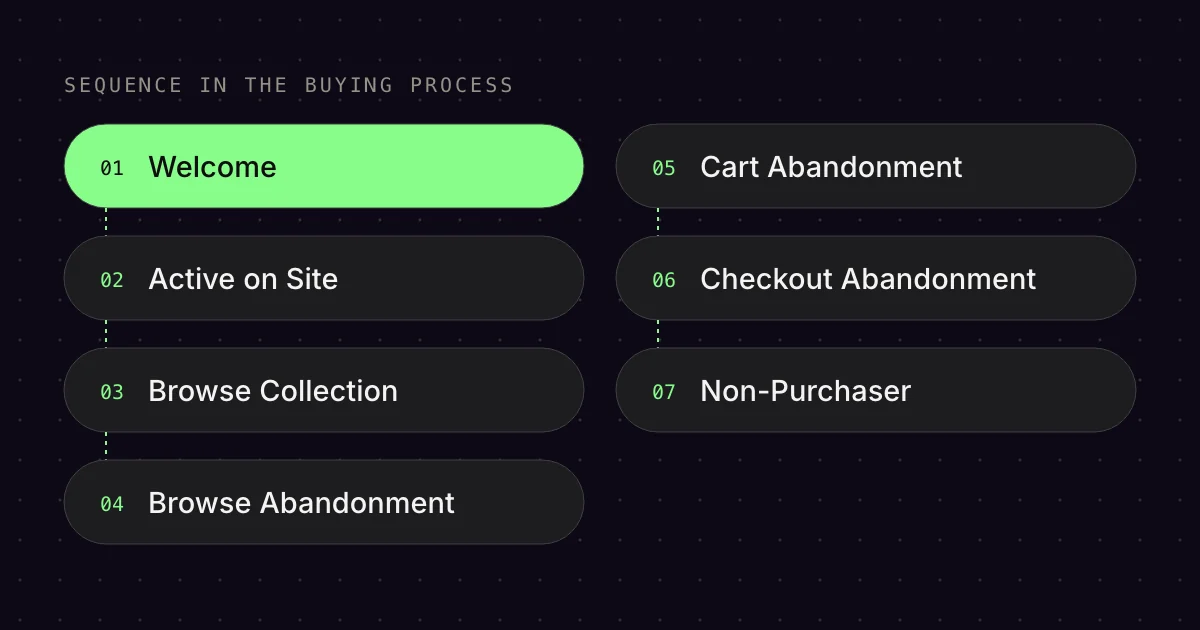
Each Pre Purchase Flow connects to a different point in the buying process. The order matters, because the further down the funnel, the higher the purchase probability and the more direct your messaging can be:
- Welcome Flow: Newsletter sign-up (entry into the system)
- Active on Site Flow: On the site, but undecided
- Browse Collection Flow: Viewed a category
- Browse Abandonment Flow: Viewed a single product
- Cart Abandonment Flow: Added a product to the cart
- Checkout Abandonment Flow: Almost bought
- Non-Purchaser Flow: 20 days without a purchase
There are also reactive flows such as Back in Stock, Price Drop and Low Inventory. These kick in on specific events.
Important: Every flow must distinguish between new and existing customers. Existing customers already know the brand and need less context, but more purchase incentives.
02Welcome Flow (8 Emails)
- Trigger or topic
- newsletter sign-up
- Scope
- 8 emails
- Goal
- trigger the first purchase
Trigger: Newsletter sign-up (e.g. via a pop-up with a discount code)[6]
Goal: Trigger the first purchase and introduce the brand
The Welcome Flow is the highest-revenue flow in almost every e‑commerce account. It reaches contacts at the moment of highest interest. The Emailfy Best Practice relies on 8 emails with a clear escalation:
- Email 1 (immediately): Redeem the discount code (percentage or fixed euro amount)
- Email 2 (day 2): About us, brand, values, socials
- Email 3 (day 4): USPs, reviews, awards, press
- Email 4 (day 6): Discount reminder “only 24h left”
- Email 5 (day 8): Qualitative feedback via Typeform: “Why no purchase?”
- Email 6 (immediately after the Typeform): Founder message or UGC/top reviews
- Email 7 (2 days later): Discount upgrade or special offer (valid for 48h)
- Email 8 (after 2 days): Last Chance
Split logic: After Email 1, the flow checks whether the email was opened or clicked. If not, a repeat email follows: “Your welcome discount is still waiting.”
Typeform feedback: Email 5 is the key. This is where you ask directly why someone hasn’t bought yet. The answers give you objections you can address in Emails 6 and 7.
03Active on Site Flow (8 Emails)
- Trigger or topic
- on the site, undecided
- Scope
- 8 emails
- Goal
- activate undecided visitors
Trigger: The user is on the site but hasn’t clicked on a product category or product page[2]
Goal: Activate undecided visitors
The Active on Site Flow has exactly the same structure as the Welcome Flow, only the trigger is different. It catches visitors who browse but don’t take action. Perfect for traffic from ads or organic sources where the user is still undecided.
Important: This flow is usually aimed at existing customers or subscribers who have already signed up. The content is therefore slightly adjusted (e.g. less “About us”, more product highlights).
04Browse Collection Flow (2 Emails)
- Trigger or topic
- Viewed Collection
- Scope
- 2 emails
- Goal
- spark product interest
Trigger: Viewed Collection (viewed a category)[3]
Goal: From category interest to product interest
This flow is shorter because the interest is already a bit more specific. Structure according to the Emailfy Best Practice:
- Email 1 (1.5h later): Bestsellers and benefits of the viewed category
- Email 2 (1 day later): Present other categories (cross-category)
Split logic: New customers get more context about the brand. Existing customers who haven’t bought in the last 25 days and haven’t received a Winback/Refill Flow also get the flow, but without USP explanations.
05Browse Abandonment Flow (7 Emails)
- Trigger or topic
- Viewed Product
- Scope
- 7 emails
- Goal
- create purchase intent
Trigger: Viewed Product (viewed a product but didn’t add anything to the cart)[1]
Goal: Turn product interest into purchase intent
Browse Abandonment is the step between “just looked” and “added to cart”. This is where the classic escalation logic comes in:
- Email 1 (2h later): Just a nudge: “You looked at [product]”
- Email 2 (22h later): Present 100% of the product (features, use cases)
- Email 3 (1 day later): Discount (percentage or fixed euro amount)
- Email 4 (1 day later): Reminder in support style (text-only, personal)
- Email 5 (2 days later): Typeform: “Why no products in the cart?”
- Email 6 (1 day later): 6 variants depending on behaviour (see below)
- Email 7 (20h later): Last Chance reminder
Email 6 variants (conditional content):
- Offer upgrade or extend the discount by 24h
- Highlight large bundles/sets or expert tips
- Bestsellers: “also frequently bought”
- Support/contact options (VHC, text only)
- Product reviews of the viewed product
- Further objection handling based on Typeform answers
Split logic: As always: new customers vs. existing customers. In addition, the flow splits by top categories vs. remaining products to deliver more relevant content.
06Cart Abandonment Flow (7 Emails)
- Trigger or topic
- Added to Cart
- Scope
- 7 emails
- Goal
- complete the purchase
Trigger: Added to Cart (product added to the cart but not bought)[4]
Goal: Complete the abandoned purchase
Cart Abandonment is the best-known flow, but most people set it up wrong. The Emailfy Best Practice uses 7 emails with a clear escalation:
- Email 1 (3h later): Just a nudge: “Your cart is waiting”
- Email 2 (21h later): Present the product’s USPs
- Email 3 (1 day later): Discount (percentage or fixed euro amount)
- Email 4 (3 days later): Reminder
- Email 5 (2 days later): Typeform: “Why not go to checkout?”
- Email 6 (1 day later): 3 variants: offer upgrade / support / objection handling
- Email 7 (20h later): Last Chance (only 4h left)
Why not offer a discount straight away in Email 1?[4] Because otherwise you train customers to wait. Build trust first, then offer the discount.
07Checkout Abandonment Flow (7 Emails)
- Trigger or topic
- Checkout Started
- Scope
- 7 emails
- Goal
- convert checkout abandonment
Trigger: Checkout Started (payment process started but not completed)[5]
Goal: Turn the checkout abandonment into a purchase
Checkout Abandonment is the highest purchase intent in the entire funnel.[4] Here the customer is just one click away from buying. The strategy:
- Email 1 (4h later): Just a nudge: “Almost there”
- Email 2 (20h later): Shipping costs, shipping service, payment methods, guarantee/returns
- Email 3 (3 days or 1h later): Free shipping discount (if the cart value is below the free shipping threshold)
- Email 4 (1 day later): Reminder in support style
- Email 5 (3 days later): Typeform: “Why didn’t you complete your purchase?”
- Email 6 (1-2 days later): 5 variants: founder message / USPs+competitor comparison / support / UGC+reviews / offer upgrade
- Email 7 (20h later): Last Chance (only 4h left)
Split by cart value: If the cart value is below the free shipping threshold, Email 3 offers a discount that covers exactly the gap to free shipping. Above it? A different incentive or just a reminder.
08Non-Purchaser Flow (3 Emails)
- Trigger or topic
- 20 days without a purchase
- Scope
- 3 emails
- Goal
- last chance for a first purchase
Trigger: 20 days after sign-up without a purchase
Goal: Last chance for a first purchase
The Non-Purchaser Flow is the last attempt before the Winback. Structure:
- Email 1 (20 days after sign-up): Address a specific objection (if a Typeform was filled in during the Welcome Flow) or highlight USPs
- Email 2 (3 days later): Discount (percentage or fixed euro amount)
- Email 3 (3 days later): Reminder
Split logic: If a Typeform was filled in during the Welcome Flow, the specific objection is addressed. If not, generic objection handling.
09Reactive flows (Back in Stock, Price Drop, Low Inventory)
- Trigger or topic
- specific events
- Scope
- 1 to 2 emails
- Goal
- react to events
These flows react to specific events and usually have only 1-2 emails:
- Back in Stock Flow: Trigger = sign-up for the notification (
Subscribed to Back in Stock). Email 1 goes out as soon as the product is back.[7] Email 2 after 2 days if there is no purchase. - Back in Stock Registration Success Flow: Trigger = sign-up for the notification.[7] Email 1 immediately with alternative product suggestions.
- Price Drop Flow: Trigger = price dropped.[8] Email 1 immediately, Email 2 after 2 days if there is no purchase.
- Low Inventory Flow: Trigger = low stock.[9] Email 1 after 15 minutes with an urgency message.
10Submitted Search Flow
- Trigger or topic
- search in the store
- Scope
- 1 email
- Goal
- help searchers find it
Trigger: Search triggered in the store[3]
Goal: The user who searches finds something (hopefully)
An underrated flow. Anyone who searches has a specific purchase intent. Email 1 after 1h 20min: “Did you find what you were looking for?” + dynamic product suggestions based on the search.
11The escalation logic: Nudge → Content → Discount → Reminder → Typeform → Objection handling → Last Chance
- Trigger or topic
- all major flows
- Scope
- 7 stages
- Goal
- discount after added value
All major Pre Purchase Flows (Welcome, Browse Abandonment, Cart Abandonment, Checkout Abandonment) follow the same escalation logic:
- Nudge: “You did something”, no hard sell
- Content: Introduce the product/brand, build trust
- Discount: Set a purchase incentive (but only after building trust!)
- Reminder: The discount expires soon
- Typeform: Qualitative feedback loop: “Why not?”
- Objection handling: Based on Typeform answers or generic
- Last Chance: Final urgency push
This structure does NOT train customers to wait. The discount only comes after several emails with added value.
12Flow excludes: why the stronger flow blocks the weaker one
- Trigger or topic
- two flows at once
- Scope
- 1 to 2 days
- Goal
- only the most relevant flow
A common mistake: someone is in the Browse Abandonment AND Cart Abandonment Flow at the same time.[1] The result? Duplicate emails, a spammy feeling, poor performance.
Emailfy Best Practice: The flow with the higher purchase probability blocks the weaker one for a set period:
- Cart Abandonment blocks Browse Abandonment for 2 days
- Checkout Abandonment blocks Cart Abandonment for 2 days
- Browse Abandonment blocks Browse Collection for 1 day
This ensures the customer only receives the most relevant flow.
Bottom line: Pre Purchase Flows are the foundation of every e‑commerce email setup. They work around the clock and catch customers at every point in the funnel. The Emailfy Best Practice: clear escalation, new/existing customer splits, qualitative feedback loops and flow excludes. That’s how you turn visitors into buyers.
FAQ
What is the difference between Abandoned Cart and Abandoned Checkout?
An abandoned cart flow starts with “Added to Cart”, as soon as someone adds something to their cart. An abandoned checkout flow starts when someone begins the checkout and enters their email address. Klaviyo recommends both as separate flows. In the cart flow, you filter out everyone who then starts the checkout.
Why don’t all visitors get a browse abandonment email?
Klaviyo only tracks page visits for visitors it can identify, for example after they sign up through a form. For Shopify stores in the EU, tracking also depends on the visitor’s consent. Anyone who isn’t identified or doesn’t consent won’t trigger a browse abandonment flow and therefore won’t receive an email.
When should the first cart email go out?
Klaviyo recommends sending the first email two to four hours after the checkout starts and the second one 20 to 48 hours later. Klaviyo’s ready-made flows wait four hours. In our setup, the first checkout email goes out after four hours and the second one 20 hours after that.
How do I prevent duplicate emails from several flows?
Prioritise the flow with the higher purchase intent. According to Klaviyo, the browse flow filters out anyone who has added to cart since the flow started, and the cart flow anyone who has started checkout. By default, Smart Sending also skips anyone who received a marketing email in the last 16 hours.
How does a Price Drop Flow work in Klaviyo?
Klaviyo starts the flow when a product’s price drops by the amount or percentage you set. It reaches people who viewed the product or had it in their checkout, by default in the last 30 days. Anyone who bought it during that time stays out. The first email should go out without delay.
Sources
- Klaviyo Help Center: “How to create a browse abandonment flow”, updated 7 Oct 2026. https://help.klaviyo.com/hc/en-us/articles/115002775252 (accessed 17 Oct 2026)
- Klaviyo Help Center: “How to create an abandoned site flow with email and SMS”, updated 7 Oct 2026. https://help.klaviyo.com/hc/en-us/articles/21137997887771 (accessed 17 Oct 2026)
- Klaviyo Help Center: “How to enable onsite tracking for Shopify”, updated 25 Mar 2026. https://help.klaviyo.com/hc/en-us/articles/4425956184731 (accessed 17 Oct 2026)
- Klaviyo Help Center: “How to create an abandoned cart flow”, updated 7 Oct 2026. https://help.klaviyo.com/hc/en-us/articles/115002779411 (accessed 17 Oct 2026)
- Klaviyo Help Center: “Shopify data reference”, updated 18 Nov 2025. https://help.klaviyo.com/hc/en-us/articles/115005080447 (accessed 17 Oct 2026)
- Klaviyo Help Center: “How to create an email welcome series”, updated 7 Oct 2026. https://help.klaviyo.com/hc/en-us/articles/115002775172 (accessed 17 Oct 2026)
- Klaviyo Help Center: “How to build a back in stock flow”, updated 7 Oct 2026. https://help.klaviyo.com/hc/en-us/articles/115003872251 (accessed 17 Oct 2026)
- Klaviyo Help Center: “How to create a price drop flow”, updated 8 Oct 2026. https://help.klaviyo.com/hc/en-us/articles/4404249033755 (accessed 17 Oct 2026)
- Klaviyo Help Center: “How to create a low inventory flow”, updated 7 Oct 2026. https://help.klaviyo.com/hc/en-us/articles/21374913673243 (accessed 17 Oct 2026)
- Klaviyo Help Center: “Understanding Smart Sending in Klaviyo”, updated 6 Aug 2025. https://help.klaviyo.com/hc/en-us/articles/115002779311 (accessed 17 Oct 2026)
This article is by Emailfy. We set up Klaviyo for Shopify stores, which is exactly what we write about here. How we work: Editorial guidelines.