

Are your emails landing in spam? Often it’s not the content but missing or misconfigured DNS records. DMARC, SPF and DKIM are three authentication mechanisms that prove to email providers that your emails really come from you.[1]
01What do SPF, DKIM and DMARC do?
- Topic
- authentication and DNS
- Key point
- work together
SPF, DKIM and DMARC complement each other in email authentication. They are set up via DNS records. Which TXT, CNAME or NS records you need depends on the method and the sending service:
- SPF (Sender Policy Framework): Defines which servers may send emails on behalf of your domain.[9]
- DKIM (DomainKeys Identified Mail): Signs every outgoing email cryptographically. The recipient can check whether the email was changed in transit.[3]
- DMARC (Domain-based Message Authentication, Reporting & Conformance): Tells the receiving server what to do if neither SPF nor DKIM passes with matching alignment to the visible sender domain. At least one of the two methods must authenticate and meet this alignment. The DMARC policy sets how failed checks should be handled (no additional action, quarantine or rejection).[1]
02Why does it matter?
- Topic
- Google and Yahoo
- Key point
- since February 2024
Since February 2024, Google and Yahoo have required bulk senders to set up SPF, DKIM and DMARC correctly.[3] Google counts everyone who sends more than 5,000 emails a day to Gmail addresses.[1] Yahoo doesn’t name a fixed number.[10] Without these records, your emails increasingly land in spam or are rejected completely.[2]
With Klaviyo, your own sending domain isn’t mandatory for all accounts, and most start on a shared Klaviyo domain.[7] It is still recommended: for bulk senders it is one of the mailbox providers’ requirements, and with it Gmail and co. recognise you more easily and your emails pass DMARC.[7]
03Setting up SPF
- Topic
- TXT on the root domain
- Key point
- only ONE SPF record
An SPF record is a DNS TXT record on your root domain.[4] Example:
v=spf1 include:_spf.google.com include:shops.shopify.com ~all[11]
The include: entries list the services that send emails with your domain (e.g. Google Workspace or your Shopify store).[11] You usually don’t need to add Klaviyo here: Klaviyo uses its own technical sender domain (Return-Path) for every email, so SPF passes there automatically.[8] ~all (soft fail) says: everything else is suspicious.[9]
Important: You may only have ONE SPF record per domain.[4] If you use several services, all include: statements must be in a single record.
04Setting up DKIM
- Topic
- key pair
- Key point
- public key in DNS
DKIM uses a key pair: a private key at the sender (e.g. Klaviyo) and a public key in DNS.[6] The recipient checks the signature against the DNS record.
With Klaviyo, you set up DKIM by adding a sending domain.[7] Klaviyo then generates the DNS records you need: four NS records for the recommended Dynamic option, up to three CNAME records for Static, plus always one TXT record as proof that you own the domain.[7] Example for Static with the subdomain send (Klaviyo shows you the real values in your account):
send.yourshop.com→ CNAME →1.klaviyodns.comkm1._domainkey.yourshop.com→ CNAME →km1.domainkey.1.klaviyodns.comkm2._domainkey.yourshop.com→ CNAME →km2.domainkey.1.klaviyodns.comyourshop.com→ TXT →klaviyo-site-verification=…[7]
05Setting up DMARC
- Topic
- _dmarc.yourshop.com
- Key point
- start with p=none
DMARC builds on SPF and DKIM. It is a DNS TXT record on _dmarc.yourshop.com.[5] A simple start:
v=DMARC1; p=none; rua=mailto:dmarc@yourshop.com
- p=none: Monitor only (collect reports, block nothing).[5] Recommended to start.
- p=quarantine: Move suspicious emails to the spam folder.
- p=reject: Reject unauthenticated emails completely. The goal, but only once everything runs cleanly.
- rua: Email address for DMARC reports (shows you who sends emails via your domain).
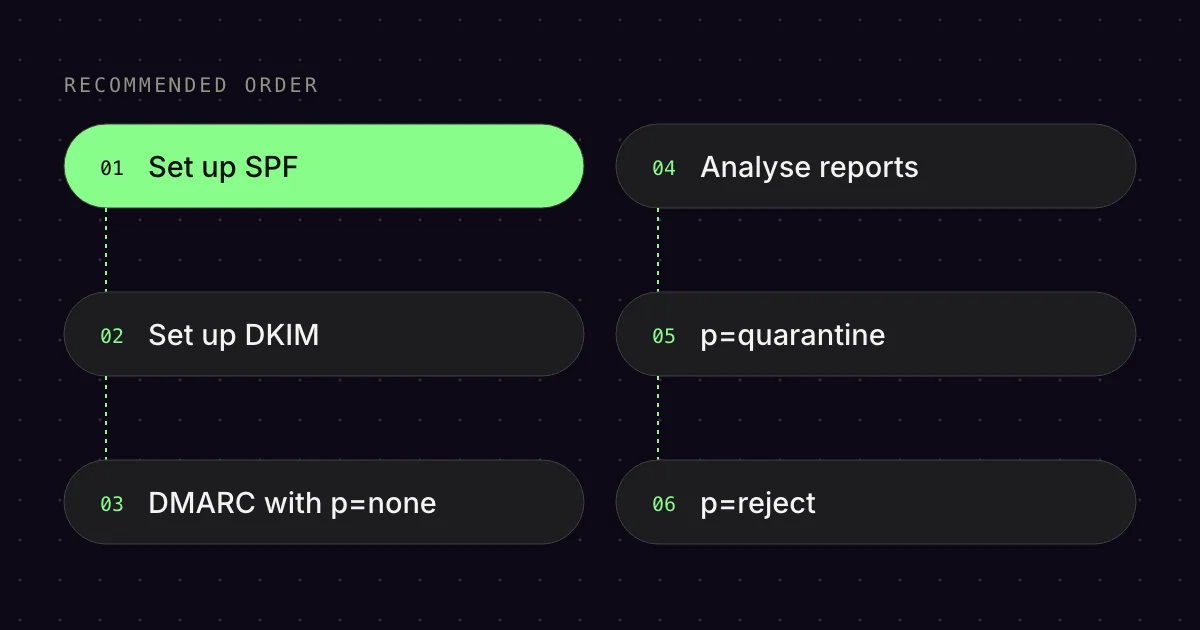
Recommended order
- Set up SPF (add all sending services)
- Set up DKIM (for every service that offers it)
- Start DMARC with
p=noneand analyse the reports - Switch to
p=quarantineafter 2-4 weeks - When everything is clean: set
p=reject
06Common mistakes
- Topic
- SPF lookup limit
- Key point
- maximum of 10 DNS lookups
- Multiple SPF records: Only one is allowed. With several, the SPF check aborts with an error (PermError).[4]
- SPF lookup limit: A maximum of 10 DNS lookups per SPF record.[4] Too many
include:entries lead to a PermError. - DKIM not set up for all services: If you send via Google Workspace AND Klaviyo, you need DKIM for both.
- Starting straight away with p=reject: Can block legitimate emails.[5] Always monitor with
p=nonefirst.
07How do I check that everything works?
- Topic
- free tools
- Key point
- Google Postmaster Tools
Free tools for testing:
- Google Postmaster Tools: Shows you delivery rates, spam rate and authentication status for Gmail recipients.[1]
- MXToolbox.com: Checks SPF, DKIM and DMARC records for errors.
- Mail-Tester.com: Send a test email and get a score with specific suggestions for improvement.
Bottom line: SPF, DKIM and DMARC are no longer a “nice-to-have”. They are a must if you want your emails to arrive. Setup takes 30 minutes. The effect on your deliverability can be huge.
FAQ
What is the difference between SPF, DKIM and DMARC?
SPF defines which servers may send on behalf of your domain. DKIM adds a digital signature to every email, which the recipient checks using a public key in DNS. DMARC builds on both and tells the receiving server what to do with emails that fail the check.
Do I need DMARC if I send fewer than 5,000 emails a day?
Gmail explicitly requires DMARC from senders with more than 5,000 emails a day to Gmail addresses. For everyone else, at least SPF or DKIM is mandatory. However, Google recommends that everyone sets up SPF, DKIM and DMARC. Important: according to Google, once you reach the threshold, you are permanently treated as a bulk sender.
Which DMARC policy should I choose to start with?
Start with p=none and an address for reports, known as the rua tag. That way you can see which services send with your domain without any emails being blocked. Only once all genuine senders pass SPF or DKIM aligned with your domain do you switch to quarantine and later to reject.
Can Klaviyo create the DMARC record for me?
Yes, if your domain doesn’t have a DMARC record yet. When you set up your own sender domain (your sending domain), Klaviyo offers to generate the record v=DMARC1; p=none. According to Klaviyo, it meets the mailbox providers’ requirements without affecting delivery. You have to add it at your DNS provider.
How long does it take for new DNS records to take effect?
According to Klaviyo, it can take up to 48 hours for a DNS change to propagate worldwide. Usually, though, it happens within a few minutes. Afterwards, check that the values exactly match the specifications, and only activate your sending domain in Klaviyo once all records are confirmed.
Sources
- Gmail Help (Google): “Email sender guidelines”, undated. https://support.google.com/mail/answer/81126 (accessed 17 Oct 2026)
- Gmail Help (Google): “Email sender guidelines FAQ”, undated. https://support.google.com/mail/answer/14229414 (accessed 17 Oct 2026)
- Yahoo Sender Hub: “Sender Requirements & Recommendations”, undated. https://senders.yahooinc.com/best-practices/ (accessed 17 Oct 2026)
- RFC Editor (IETF): “RFC 7208: Sender Policy Framework (SPF) for Authorizing Use of Domains in Email, Version 1”, undated. https://www.rfc-editor.org/rfc/rfc7208 (accessed 17 Oct 2026)
- RFC Editor (IETF): “RFC 9989: Domain-Based Message Authentication, Reporting, and Conformance (DMARC)”, undated. https://www.rfc-editor.org/rfc/rfc9989 (accessed 17 Oct 2026)
- RFC Editor (IETF): “RFC 6376: DomainKeys Identified Mail (DKIM) Signatures”, undated. https://www.rfc-editor.org/rfc/rfc6376 (accessed 17 Oct 2026)
- Klaviyo Help Center: “How to set up a branded sending domain”, updated 30 Sep 2026. https://help.klaviyo.com/hc/en-us/articles/115000357752 (accessed 17 Oct 2026)
- Klaviyo Help Center: “DNS and SPF setup troubleshooting in Klaviyo”, updated 30 Sep 2026. https://help.klaviyo.com/hc/en-us/articles/50941715515675 (accessed 17 Oct 2026)
- Google Workspace Help: “About SPF records”, updated 13 Oct 2026. https://knowledge.workspace.google.com/admin/security/about-spf-records (accessed 17 Oct 2026)
- Yahoo Sender Hub: “FAQs”, undated. https://senders.yahooinc.com/faqs/ (accessed 17 Oct 2026)
- Google Workspace Help: “Set up SPF”, updated 13 Oct 2026. https://knowledge.workspace.google.com/admin/security/set-up-spf (accessed 17 Oct 2026)
This article is by Emailfy. We set up Klaviyo for Shopify stores, which is exactly what we write about here. How we work: Editorial guidelines.